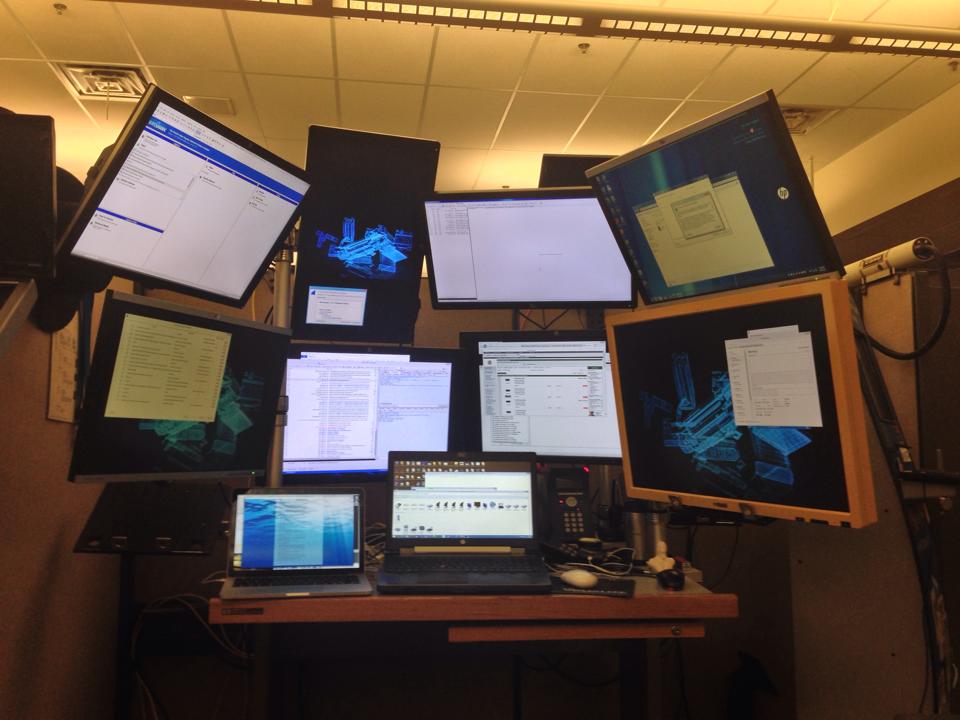
I figured someone would ask. I do a fair amount of pen testing in addition to development. Because I work with a lot of hardware solutions I need to run multiple instances of my tools. In a typical assessment I'll have a VM running a raw packet capture & another running an HTTP interception proxy. These will be "watching" the hardware device. I'll then replicate that same configuration to watch host browser traffic. Right there I'm at four monitors just to watch my instrumentation. I'm at a fifth for the web browser to interact with the environment & a sixth for taking notes. I typically like to have a chat going with other members of the team as well as e-mail so that's seven right there. Many time's I'll need to write rules for on the fly packet manipulation so now I'm at a solid eight. If I must also instrument the server side then I start compromising on having e-mail open.
For years I dealt with alt-tab between windows as well as using various windows managers so I could have multiple desktops but the problem was that I couldn't have eye's on what was going on in the instrumentation. This setup saves me a massive amount of time.
Here's a picture with two additional monitors mounted to the wall next to my desk which are connected to another system I use:
Wow, that's pretty impressive. I take it you are in the Seattle area then, with that Windows 8 screen on your laptop? That's what mine defaulted to and I'm in the area.
I'm in the NW but not Seattle. I think that's just its default. That's an HP ElitePad sitting on a doc not connected to any monitors. That particular day I'd just re-installed the OS to take a look at the TPM.
Rock climbing. Seriously. It keeps my neck strong, my back strong, and my hands from getting RSI. Also, it's not like I'm looking at the same monitor all day long so I have a fair amount of head movement during the day.