I use B2 as the backend for my personal backups using restic (which I would highly recommend https://github.com/restic/restic). I don't have a ton of data to backup, so even with hourly backups (restic only backs up when there are changes) I have ~100GB and it runs me a whopping $0.60/month. I almost feel guilty when I get the bill. But the minute I need to pick a storage platform in a professional context I know what my first choice will be.
(I am _not_ affiliated with Backblaze in anyway. Just a happy user)
For $9/month you would get a lot more features from the backup service. The interesting ones being File Sharing and Extended Version History. So it depends if you want those, as well as a nice web UI. And at 1TB the numbers get closer, at 2TB it becomes cheaper to use the backup service.
The main thing for me is legacy. In my will it is a lot easier to explain how to get files from the standard backup plan, rather than install a tool from Github etc.
That’s $9 per computer, not directly comparable to raw storage to use however you want. I get there are ways around this (host a local centralized backup) but that then sort of destroys the turnkey part anyway.
The per computer thing made me move to iDrive but I will move back for the UX. I am going to do a hybrid where one computer is backed up with the majority of files, and for other computers use free Dropbox tiers.
Depending on which service from iDrive you use, the total lack of deduplication with its personal backup service was a complete no-go for me. If you can't dedupe, any changes to your folder names or locations provoke a whole new upload cycle, which is absurd.
any drive attached is stored. Ive been backing up 20tb and its a deal. unlimited and you just have to make the OS think the drive is us attached or internal
With rclone B2 has backup on delete, which you can expire after an arbitrary period.
I used to be a Backup customer until recently when it threw out errors on my macOS machine. The solution according to support was to remove my backup including version history. When I complained that was a problem, they suggested a second account, which they would refund the price for, after I made the switch.
Rclone give me more control, which I like. I use tmutil to create snapshots of what I backup, too. Very slick.
First make sure you understand how they handle encryption. The features and ease of use come at the cost of some security.
They generate a public/private key pair for the user. The client gets the public key and the server gets the private key. During backups the data is encrypted on the client with a symmetric key (which I believe is generated on the client). The encrypted data is sent to the server. The symmetric key is encrypted using the public key and also sent to the server.
On a restore they use the private key on the server to decrypt the encrypted symmetric key, use that key to decrypt the backup data, and then make the decrypted files available in a zip file that the user can download. The download is over HTTPS so is encrypted in transit.
If you don't like the idea of them having such access to your private key they do offer an option to add additional protection [1]:
> The user’s private key which is stored safely in our data center is protected by a password that is highly guarded. But for some users this is not good enough and we allow the user to secure this file with their own password. When this is done it is impossible to access the data without the user’s password. Unfortunately, this also means we can’t help the user if they ever forget this password so we don’t recommend it for most users.
If you do that then when you restore you have to enter that password on their site when requesting the restore, so their server can decrypt the private key.
They give some more detail in their "Security Question Round-up!" [2]:
> The answer shows a weak point in the Backblaze system. As you prepare a restore, you must type in your private passphrase into the restore server. This is not written to disk, but held in RAM and for the period of time of decrypting all your files, and they are then stored in "clear text" on our very highly secured servers until they are ZIPPED up and offered to you to be downloaded. At that moment you can download them (by HTTPS only), then you can "delete the restore zip" which means you close the window of time that your files are available in plain text.
> So to recap: if you never actually prepare a restore, we cannot possibly know what is in your files, but if you prepare a restore (let's say of a few files) then for the couple minutes they are being prepared and downloaded they are in "plain text" on a HIGHLY SECURE system in the Backblaze datacenter. At that moment, if a Backblaze employee were malicious enough and dedicated enough and was watching (which is actually pretty hard, we get thousands of restores every day so it would fly by quickly) they could see your filenames appear on the Linux servers right before they are ZIPPED up into a new bundle. A few minutes of exposure.
> We actually want to improve this to provide a password encrypted ZIP file for download, and then the FINAL improvement is to actually allow you to download the private encryption key, download the encrypted files, and provide the pass phrase in the privacy of your computer. We hope to add this functionality in the future.
While I completely agree: I don't believe this applies to Restic (or many other many-cloud-host backup software). It seems to be using the dumb S3 like API with an entirely local encryption, as do many others because that's kinda the only portable way to do encryption.
I have not dug into it in detail though, so I would encourage everyone to not believe this without verifying.
Yup. What can cause confusion is that Backblaze is offering multiple storage products. One is a cloud storage service similar to S3, and one is a computer backup service and accompanying client software.
• If you use the backup service, which is called Computer Backup, Backblaze supplies the client backup software. Computer Backup is $9/month/computer (with discounts if you pay in advance which can lower it to $5.25/month/computer if you pay 3 years in advance) and has file sharing and mobile apps.
It's meant to be an all-in-one easy to use backup service that you don't have to think much about.
• If you are using the S3-like service, which is called B2, Backblaze just provides storage and an API. If you want to use it for backup you have to supply the backup software, such as Restic. It is priced based on storage rather than number of computer, costing $6/TB/month.
There are no data transfer costs for uploads. Downloads are $0.01/GB but each month you get free up to 3x the total amount you have stored. You'd have to be having a really bad month if you had to restore your entire backup more than 3 times!
There are also charges for using some API calls. It looks like upload and delete calls are free, download calls are 2500 free per day then $0.0004 per 10000, and calls that manipulate data on the server like copying are 2500 free per day then $0.0004 per 1000 calls. That doesn't seem too bad. Downloading a million files in one day would be about $0.40.
But surely someone who is actually that concerned about security will have the files being backed up already encrypted before they're backed up to b2? That way no need for encryption b2 side, then decrypt them locally after pulling them back down again.
The numbers you are shared are mind-blowing to me. Can you confirm: Do you pay your bill (1) monthly and (2) by automated credit card payment? If yes, don't the credit card transaction fees paid by Backblaze exceed the amount!? This post has literally inspired me to sign-up. I have put off Internet backups for a long time!
It seems around 0.6€ is where they judge it worthwhile to create an invoice. I have even less data (because I only backup my server there, for my PC I use backblaze personal with payments every 2 years), and they charge me 0.6-0.85€ every 2 months.
Backblaze B2 is their generic object storage platform similar to S3. You pay what you use and it scales into petabytes. There's no minimums so if you're only using small amounts, you get a small bill at the end of the month. It's not backup software, just the underlying cloud storage platform.
B2 is not Cloud Backup, B2 is there S3 compatible storage that you pay by the GB
your links are to their "backup" service which is only for Windows and Mac computers, and is limited to their backup app which many people report having throttling and other issues, it is "unlimited" in the sense that it should only be used for a single computer, which is why they never support Linux on it, because they believe (probably correctly) that linux support would mean most people will install it to NAS devices and ruin the business model for everyone else
Historically that has been the case for all of the backup solutions that offered "unlimited" data for a fixed price monthly, I think BackBlaze is the only remaining vendor in the game that does
If Hetzner storage boxes work for you, that would be less than 4 euros per month with unlimited traffic. Next level up is 13 euros for 5TB. (It works fine with restic over ssh but also has options for samba, webdav etc in addition to borg server. Now that I am looking at the info page, it seems restic is listed now too but I am not sure if it's via rclone . https://www.hetzner.com/storage/storage-box )
Yes, big difference. With B2 you’re just getting the raw storage, so all backup and restore operations have to be done through restic.
With their personal computer backup offering, there’s a web interface that you can use to download individual files from your backups, share files, or even have them mail you a flash drive containing your full backups.
Restic is good for storing files on computers you don't control because the private key doesn't get exposed. It also has features for snapshots and testing backups. You can select a percentage to test so if you have a slow internet connection you can get some piece of mind without having to download all your backup data.
I mean reading that thread, the problem itself is certainly worrying but the response from B2 is pretty golden, that's some great customer/technical support.
We're so lucky that Backblaze creates these reports and shares them openly. That's not normal for companies to do and it's valuable for us consumers to get these insights.
Actually I'm referring to their drive stats and not their storage pod stats like in this report.
Yev from Backblaze here -> We love creating these and it's a team effort internally which a bunch of departments like to help with. Also appreciate the kudos and we share it with the org as well. You keep reading it and we'll keep making it! :)
    Total Data Stored    Monthly Downloads    Cost
    1TB                  1000TB               $119,712/yr
    1000TB               1000TB               $72,000/yr
What is the cheapest TDS for a given 1000TB monthly downloads?
Seems to be:
334TB 1000TB $24,048/yr
So there are situations where uploading dummy files that pad with zeros will reduce your bill.
---
Edit: The 334 now seems obvious when you consider:
* Egress is $10/TB
* Store is $6/TB
Free Egress is 3x monthly data store. So egress costs $6/TB when you get it 'free' vs $10/TB, so you need it all free to get the cheapest egress, which means you need 1/3 storage that is egress. Any higher and your wasting money on storage!
From the very top, this is great analysis. I wonder if they are willing to strike a deal if you need relatively high egress, but very low storage. Also, I do expect that Backblaze's lifetime egress costs per drive far exceed the TCO for the drive (minus egress). Zero trolling: It would great to see some commentary directly from Backblaze on this matter -- for example, explain that egress is very expensive.
EDIT
Above, you wrote that egress is 10 USD / TB. What are egress costs for Amazon, Google, and Microsoft?
Full disclosure - I am Chief Technical Evangelist at Backblaze.
Pulling the egress costs from the hyperscalers' storage pricing pages:
* Amazon S3 ranges from $50-$90/TB depending on monthly volume.
* Google Cloud Storage ranges from $80-$230/TB depending on monthly volume and where you're transferring data to/from.
* Azure Blob Storage ranges from $40-$181/TB (with the First 100GB/month free) depending on monthly volume and whether you route data via the Microsoft Premium Global Network.
Cloudflare published a blog post a couple of years ago explaining just how much money AWS makes on egress - customers are paying up to 80x Amazon's costs: https://blog.cloudflare.com/aws-egregious-egress
> I wonder if they are willing to strike a deal if you need relatively high egress, but very low storage.
It depends on what "very low" means. We have a capacity-based pricing option, Backblaze B2 Reserve, starting at 20 TB, that includes all egress and transaction fees.
Pat Patterson: Hat tip! Thank you for the excellent follow-up. In short, your prices of 10 USD / TB are a steal according to your data. Keep up the great work. I'm not yet a customer, but I will be very soon.
I really wished Backblaze B2 worked better to be a real alternative to S3. The pricing is a middle finger to AWS and other providers.
However, we were having 1 outage per month with B2, and in the middle of 2023 we decided to go back to AWS and only use S3 for replication.
We still monitor both services simultaneously (S3 and B2), and every other month we are still having an episode where the latency rises from 15ms to something like 25 seconds for each write/read operation.
Full disclosure - I am Chief Technical Evangelist at Backblaze.
Backblaze B2 does include deletion prevention (object lock) and lifecycle management to automatically hide (soft delete) or (hard) delete objects according to a schedule.
The problem for us was the latency - sometimes it would take ~2s to serve an image. We ended up putting Cloudflare in front of it and that worked but might have actually been against their ToS (I know there have been some changes to it since then).
I have tried several S3 Alternative so far Wasabi has been the best...
I had some Latency and Bandwidth problems when trying to push alot of data into BackBlaze not terrible but slower than Wasabi it however was usable. Some of the other vendors I tried were not even usable
It depends. Cloudflare R2 has unlimited free egress; if you’re using a Cloudflare Worker already and proxying the download, then Backblaze B2 becomes cheaper again because egress is free and unlimited.
One useful trick is if you’re already using a Cloudflare Worker, you can force cache fetches to Backblaze B2 (or any S3 provider). This is allowed by Cloudflare’s ToS as you’re using a Worker.
My understanding is a worker isn't a way around that, they clarified that all in their blog here:
https://blog.cloudflare.com/updated-tos/
> Finally, we made it clear that customers can serve video and other large files using the CDN so long as that content is hosted by a Cloudflare service like Stream, Images, or R2.
> Video and large files hosted outside of Cloudflare will still be restricted on our CDN
It is a bit confusing, espec when they only enforce it at super high usage/when it becomes an issue, but makes sense that a Worker isn't a magical free pass when you don't get charged Bandwidth on them either
I continue to be super confused by this. The blog post says, as you quote:
> we made it clear that customers can serve video and other large files using the CDN so long as that content is hosted by a Cloudflare service like Stream, Images, or R2.
But when I click through to the specific CDN terms it still says:
> Unless you are an Enterprise customer, Cloudflare offers specific Paid Services (e.g., the Developer Platform, Images, and Stream) that you must use in order to serve video and other large files via the CDN.
A plain reading of this would still make me think putting the CDN in front of video files on R2 was forbidden. It is now clear that you can use (the very expensive) Stream to serve video, sure.
Yea.. the blog post and the terms don't exactly align. Looking at the Terms only, they say "specific Paid Services" and in the Developer Platform Terms, further say
> The Cloudflare Developer Platform consists of the following Services: (i) Cloudflare Workers, a Service that permits developers to deploy and run encapsulated versions of their proprietary software source code (each a “Workers Script”) on Cloudflare’s edge servers; (ii) Cloudflare Pages, a JAMstack platform for frontend developers to collaborate and deploy websites; (iii) Cloudflare Queues, a managed message queuing service; (iv) Workers KV, D1, Durable Objects, Vectorize, Hyperdrive, and R2, storage offerings used to serve HTML and non-HTML content...
Key part being the last bit there, they specifically call out products which can be used to serve non-html content as part of the Dev Plat, and Workers is not one of them.
Cloudflare employees in the past have specifically and repeatedly say CDN in front of R2 is fine, but nothing about Workers except really old posts that predate the ToS changes and the blog post.
Given that no Cloudflare employees chimed in when we talked about this last on Discord, seems they’re confused too.
I should probably use our enterprise support for once to get a clarifying answer..
Personally / my company is sticking with what the terms say, and not a blog post (which may not have been reviewed as heavily). Makes sense, since we agreed to the terms, not every blog post.
> they specifically call out products which can be used to serve non-html content as part of the Dev Plat, and Workers is not one of them.
Ah, but R2 is! My specific question was about whether I could serve video from R2 via the CDN... it sounds like yes, probably? They have not really succeeded in making their terms totally transparent here.
I actually have no opinion on how/if workers are involved...
You definitely can via R2. The blog post specifically says it, in my (not a lawyer) opinion the terms pretty clearly say you can by saying specific paid products can bypass the limitation, and the dev plat terms saying R2 is one of those specific products, and numerous employees have said it's fine, and I've heard cases of people pushing PBs of data per month without any issue.
I have no doubt about that at least.
It’s been several months since I last did any testing, but I do remember B2 being faster (latency) R2 when we did some benchmarks (small files only) with a Worker.
The most interesting thing here is the discussion about using vendor hardware instead of their own bespoke stuff.
My takeaway is that it's still essentially impossible to negotiate anywhere close to a fair price with commodity server vendors until you are buying hundreds of machines, and then only if you are capable of demonstrating that you are willing to design and build them yourself. And yet despite this, it's still cheaper than cloud even paying advertised prices.
Where do regular people buy servers without insane markup if you need say 10-20? Used to be I could actually buy supermicro barebones, but that ended a really long time ago.
You get two VARs, one with Dell and one with HP. Then a couple back and forth negotiation rounds and you will be paying 40-50% of MSRP. Or even try to do it direct with your Dell/HP reps, since VARs are of dubious value.
Before someone uses Google's servers as an example, I would say that strapping together consumer grade components with zip ties and no case isn't what I'd consider a 'server'; rather, a loose collection of parts.
Google has 3 orders of magnitude more servers than I’ll ever need. With that sort of difference it’s not only a change of solution but also a change of rules.
My sense is that storage server prices have had to come down to compete with both cloud (like S3 archival tiers) and roll-your-own solutions. The former are relatively recent and the latter have become more feasible as companies—Backblaze among them—have open sourced well-engineered designs. Storage server margin used to be insane, over 80% after COGS back in the 00s and only slightly less last decade, and there's still room to compete.
I hope history will eventually read something like this:
In the aftermath of the Dot Com Bust, manufacturers became conservative, and lost their ability to dream big. Into this power vacuum stepped the so called Cloud Providers, who in some cases made their own hardware and tools to solve their problems.
Over time manufacturing caught up, missing tools were written, and the Cloud providers went back to solving the main problem nearly none of their customers of suppliers could ever solve: the speed of light (locality).
> Over the last few years, we began using storage servers from Dell and, more recently, Supermicro, as they have proven to be economically and operationally viable in our environment.
They may have just reached a scale where it was viable, where it wasn't before. The bigger you are, the bigger discounts you can negotiate. They also certainly have the leverage to walk away from a deal, since they have proof "hey, we'll just build our own if we don't like your offer."
I would imagine that in the early days there was nothing that met the requirements. Early on very few systems had the drive density needed - products like Sun's Thumper with 48 drives (https://en.wikipedia.org/wiki/Sun_Fire_X4500) were few and far between.
Today there are lots of high storage density devices, so no point to build your own if you can get it already engineered and with a warranty from somewhere else.
Recently got a Synology and have been considering cloud backup needs. Mine would roughly be a terabyte, and so far my thinking is shaking out as:
For incrementally backing up laptop data, the process needs to run on my laptop anyway, so I may as well just use Arq.
For NAS data that changes frequently enough to desire incrementals, choose Synology Hyperbackup.
For NAS data that doesn't change frequently and can just be sync'd, choose Synology Cloud Sync.
For NAS data that you don't need locally and only need to archive, choose Synology Cloud Sync with one-way-sync. (Less hassle than AWS Glacier.)
As for the cloud provider itself, I'm think I'll probably go with Wasabi, at $6/TB. I heard that Backblaze occasionally has weird gotchas that surprise people, like auto-deleting files from your backups that you delete locally, so I just feel cautious.
Main things giving me pause: minimum block size on Wasabi (I'm sure some of my files are smaller; don't know what sticker shock I'll experience), and unsure why I should consider a command line tool like restic instead of the above.
So many options… and the data is likely very precious so it is worth the time to review and test what you can.
I tried several different configurations and finally landed on the following.
I have a Synology that I have been running for a couple years now.
- RAID 0 w 2 14TB drives, 400GB is highly critical
The 400GB of highly critical is further backed up:
- external 1 TB SSD that lives at my sisters house and is updated monthly or so using Sync w encrypted EXT4 formatting
- B2 sync with 1 way, encrypted backup and nightly updates (using Backblaze’s encryption because Synology requires your device and if that goes… you are sol)
I friggin love it. I have restored things several times to test the process and it just works.
It only costs me $2/ mo for Backblaze B2 with that amount of data. Well worth it.
Full disclosure - I am Chief Technical Evangelist at Backblaze.
> I heard that Backblaze occasionally has weird gotchas that surprise people, like auto-deleting files from your backups that you delete locally, so I just feel cautious.
We have two similar products, and it's easy to mix them up. To clarify:
Backblaze Computer Backup (a different product from Backblaze B2) deletes old versions of files from your backup either 30 days or 1 year (you choose which) after you delete them locally. You also have the option to enable "Forever Version History", which costs $6/TB per month once your files age out of the backup.
Backblaze B2 (S3-compatible cloud object storage) will never delete anything unless you tell it to do so, either via the API or a lifecycle rule.
>>>All 40 of the Dell servers which make up these two Vaults were relocated to the top of 52U racks, and it appears that initially they did not like their new location.
Or the way in which they were handled during the relocation?
My guess would be vibration at the top of the rack which is why when you relocate them they do much better. This is such a great thing to call out explicitly with data.
“All 40 of the Dell servers which make up these two Vaults were relocated to the top of 52U racks, and it appears that initially they did not like their new location. Recent data indicates they are doing much better, and we’ll publish that data soon.” Italics mine.
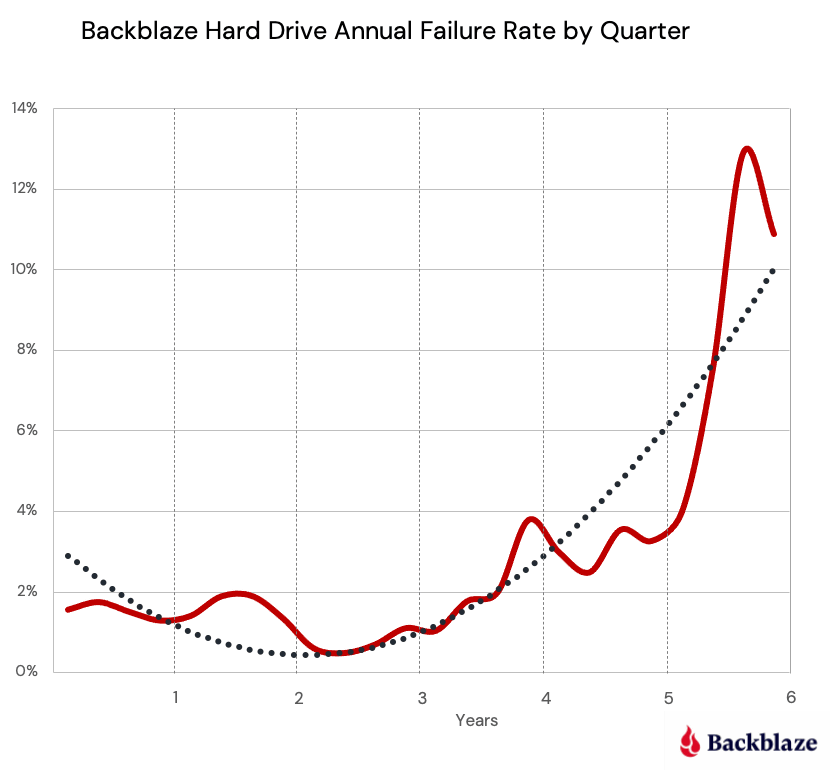
I love these so I'm really sad to say this: What's missing is an AFR based on deployed time in increments, not total time.
For example: there should be a sliding window (or a histogram) relating to AFR after deployment for a time frame.
IE: AFR between 0-300 days, AFR between 301-600 days, AFR between 601-900 days (etc).
Otherwise we're looking at failures historically for the entire period, which might hide a spat of failures that consistently occur 3 years in, giving a relatively unfair advantage in numbers to newer drives.
That said, I really do love these and I hope they continue.
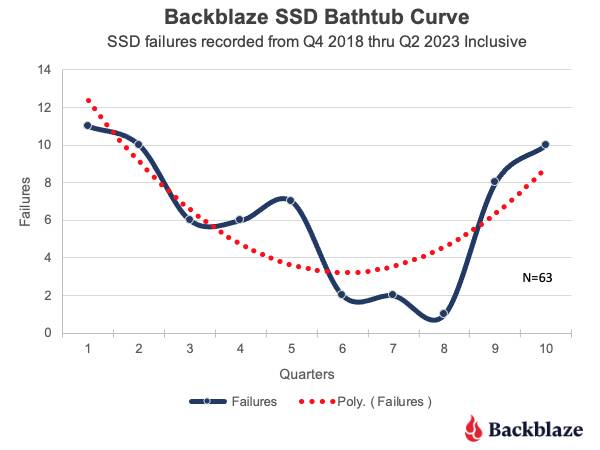
Backblaze's SSD bathtub curve shows higher failure rates < 6mo and > 3yr, with a sweet spot around 1.5yr where the failure rate is 4-5 times lower. -
https://regmedia.co.uk/2023/09/26/bathtub.jpg
Yev from Backblaze here -> I'm heading up the Computer Backup product, what would you like to see changed or updated? I can make sure to send it to the product team! Or you can fill out our product suggestion portal -> https://www.backblaze.com/product-portal.
Perhaps they reverted their decision, but they did indeed discontinue their Crashplan service for non-businesses[1].
I was using it at the time and had to find an alternative, which I never really did. I tried restic and similar programs, but they were all too slow finding what changed. The key to Crashplan was that it monitored the filesystem for changes, so it didn't have to do an expensive traversal.
In the end I settled for just using the daily full-image backups I was already taking and forego the <15min backup points I had with Crashplan.
Been missing it a few times, but overall surviving without.
As the article notes, they just ended the "CrashPlan for Home" plan and decided not to do B2C marketing, but they remain happy to take money from individuals. At the time I just migrated to "CrashPlan for Business" and paid them $10/mo (because I have a NAS), but thanks to your note I'll be moving to CrashPlay Pro (which is cheaper on a yearly basis).
I wished they'd emailed me back and told me. Now if I want to switch back I need to run two solutions concurrently until the Crashplan is fully populated again.
What a stunning way to reduce customers. Their Biz Dev people must be so proud.
What's my best bet for cost-effective and convenient external local storage? I have a ton of photos and large videos which are consuming tens of GBs on my main computer's hard drive. Just get a cheap thumb flash drive?
I'd recommend a USB-connected external hard drive (not SSD). You don't have very much data, so a thumb drive could probably hold everything, but SSDs/flash aren't great for long-term data storage and will lose their data if you don't power them up and use them now and then. An actual HD doesn't have this problem, plus they're typically 1TB+ so you'd have plenty of space for future needs.
Alternatively, you could get a handful of flash thumb drives and back up onto all of them, syncing with a different one each week/month/whenever so that they're all getting continuously refreshed and you'd have snapshots in case you accidentally delete something and that deletion gets synced to the most-recent drive.
I'm cautious so I sync to Backblaze from my Synology as well as S3 with a lifecycle rule to Glacier. You could easily just do B2, C2 or S3 depending on your needs.
Glacier. Yeah not sure if its worth it but figure its handy if there is a fire. Would be great if the family would stop taking so many photos and videos.
Just remember, local external drives can still burn up in fires or drown in floods. I thought about this recently a lot and went with a Synology where I can have all of my data locally but backup that data to B2 (Backblaze) automatically.
That 10TB drive is 100% fake! Amazon is full of fakes.
A good rule of thumb right now is $60/TB, significantly less and you're approaching fake territory.
I should be clearer - that drive is fake if it's an SSD, it's a normal price for HDDs. Cost per TB of HDD isn't linear, though, it's a bit of a bathtub based on drive capacity and feature set (e.g CMR vs SMR)
If there is one company that could give accurate stats on what drives actually perform better and what drives are the worst and fail more often it is Black Blaze, but yet they don't. What a missed opportunity to provide some insight.
They've been publishing these stats for years and years now, too. It's a wealth of data they've provided and has helped me pick the dozens of drives I've ordered over the years
Where are you ordering your drives from these days? In the past I went from physical shops -> new egg -> amazon and now amazon and new egg aren't reliable sellers and the physical shops are either gone, under-stocked, or buy their stuff on amazon too.
B&H is usually a safe choice. Newegg and Amazon can be too if you're careful with who the seller is. Drives for work often get placed through an enterprise wholesaler like CDW or MARKIT.
For my personal NAS projects, I generally buy a WD MyBook/EasyStore from Best Buy and shuck the drive. The drive on the inside is generally a WD White Label, which is a WD Red (NAS drive) that didn't meet QA specs. I wouldn't rely on them for mission critical stuff, but they're perfect for a Plex server and you can generally get them cheap. (worth noting that I've seen a few say they've been removing the SATA connections from these recently and I haven't bought one in about 15 months so do some research before purchasing)
I just went through this so I can well you B&H and Microcenter both did well for me. I actually had a failed drive from B&H (one of two) who took care of it and refunded my money. The best advice I can give though it order drives from different suppliers or batches so you don't get two from the same batch which can sometimes have a problem.
I don't know why they're buying COTS server gear because their whole premise was the economy-of-scale of having their own pods made. I don't understand why they don't go to Quanta or Foxxconn to build them whatever they need because Dell is really just a marketing front like CDW that relies heavily on third-party contract designers and major component manufacturing, and then only does final assembly itself.


(I am _not_ affiliated with Backblaze in anyway. Just a happy user)